How to Reduce Administrative Work in a Chiropractic Practice
21.10.26
Too much paperwork and not enough time for patients? Discover seven practical ways to simplify scheduling, SOAP notes, patient intake, and everyday administrative tasks in your chiropractic practice.
Running a chiropractic practice involves much more than treating patients. If you’re trying to reduce administrative work, start with tasks like answering calls, managing appointments, updating patient records, writing SOAP notes, and collecting payments. Together, these everyday responsibilities can take up a surprising amount of the day.
For solo chiropractors, that often means finishing paperwork after the last patient leaves. In larger clinics, the same tasks can create bottlenecks at reception, interrupt practitioners between appointments, and leave staff constantly catching up.
The good news? Improving your chiropractic office efficiency doesn’t necessarily require hiring more people or changing how you deliver care. Often, the biggest improvements come from simplifying the small, repetitive tasks your team handles every day.
In this guide, we’ll walk through seven practical ways to reduce administrative work in a chiropractic practice, identify where time is being lost, and build a smoother workflow from booking to checkout.
Why Administrative Work Builds Up in Chiropractic Practices
A chiropractic appointment may last just 15 or 20 minutes, but the administrative work surrounding it can take considerably longer. Think about everything that happens before, during, and after a typical visit:
A patient calls to schedule or reschedule an appointment.
The front desk checks practitioner availability.
A new patient receives paperwork to complete.
The chiropractor reviews the patient’s history.
Clinical findings and treatment details are documented.
The patient checks out and receives a receipt or invoice.
A follow-up appointment is booked.
Records and payment information are updated.
None of these tasks is particularly unusual. The problem is how frequently they’re repeated. A few extra clicks, a missing form, or a five-minute delay at checkout might not seem significant on its own. But when the same friction occurs throughout a busy clinic day, it adds up. The goal isn’t to eliminate administration completely. Accurate records, patient communication, and financial processes are essential.
The goal is to reduce unnecessary steps while keeping the important ones.
1. Identify Where Your Team Is Losing Time
Before introducing new software or changing your office procedures, start by understanding where the administrative workload comes from. For one week, pay attention to the tasks that repeatedly interrupt your team. Do patients frequently call to ask about available appointments? Does your receptionist enter the same information into multiple systems? Are chiropractors spending their lunch breaks catching up on SOAP notes? Make a simple list of recurring tasks and estimate how much time they require.
Administrative task
What to look for
Possible improvement
Appointment booking
Repeated calls and messages
Online self-booking
Rescheduling
Manual calendar updates
Faster scheduling tools
New patient paperwork
Forms completed at reception
Digital intake forms
Clinical documentation
Notes left until the end of the day
Structured SOAP templates
Checkout
Re-entering services or patient details
Connected billing workflow
Appointment reminders
Staff calling patients individually
Automated reminders
Don’t try to fix everything at once. Choose the two or three tasks that cause the most disruption and start there. Even relatively small improvements can make a noticeable difference when they affect every patient visit.
2. Make Appointment Scheduling Easier for Everyone
Scheduling is often one of the most interruption-heavy parts of running a chiropractic office. A patient calls while the receptionist is checking someone in. Another wants to move tomorrow’s appointment. A third needs to know whether their preferred chiropractor has an opening next week. Each request is manageable. Together, they can keep the front desk from completing other important tasks.
Offer Online Booking for Routine Appointments
Allowing patients to book appointments online can reduce the number of routine scheduling conversations your team needs to handle. One practical way to reduce administrative work is to let patients book routine appointments online. Patients can choose from available appointment times without calling during office hours, while staff remain available for questions that actually need personal attention.
Before enabling online booking, make sure your system reflects the services, appointment lengths, and availability your practice wants to offer. For example, a new patient examination might need a longer appointment than a routine follow-up. Your calendar should account for that distinction rather than treating every visit identically.
Simplify Rescheduling
Even with online booking, your staff will still need to make occasional changes. A calendar that allows quick appointment adjustments can make this easier, especially when several practitioners share the same reception team.
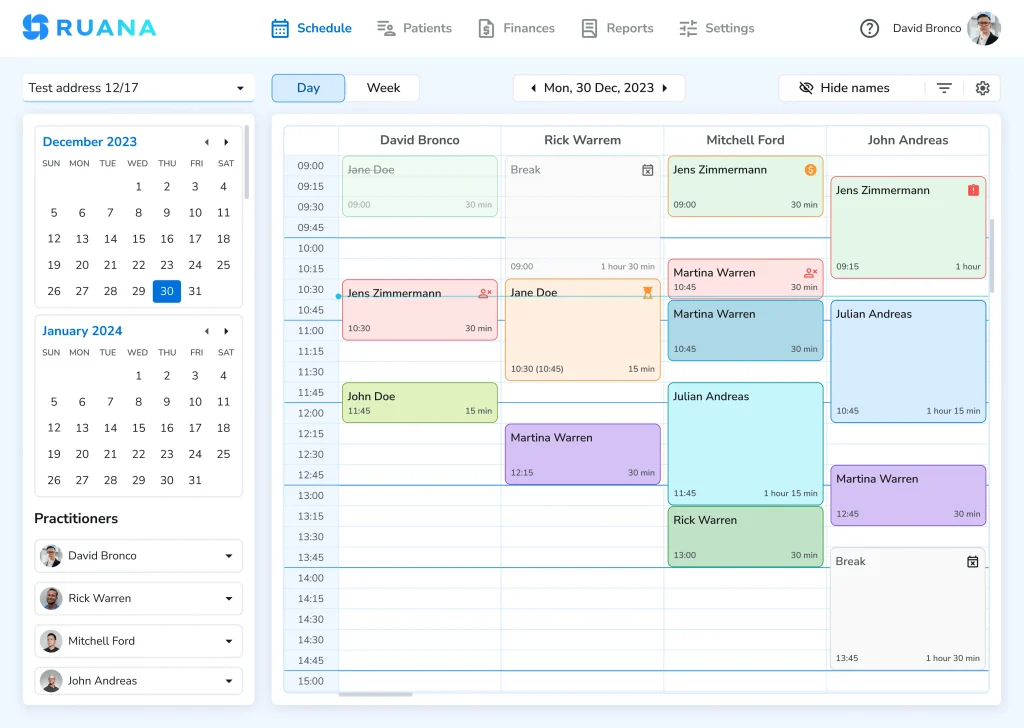
With Ruana’s scheduling software, practices can use a color-coded calendar, filter practitioner schedules, and drag and drop appointments when plans change. The benefit isn’t simply having a digital calendar. It’s reducing the steps involved in managing a busy one.
3. Stop Collecting Patient Information Twice
New patient visits often involve more administration than follow-up appointments. Patients may need to provide contact information, medical history, current symptoms, medications, and signed consent forms. When this happens on paper at the front desk, someone may need to check the forms for missing information, scan them, and enter details into the patient’s digital record. That creates unnecessary duplication.
Move Intake Before the Appointment
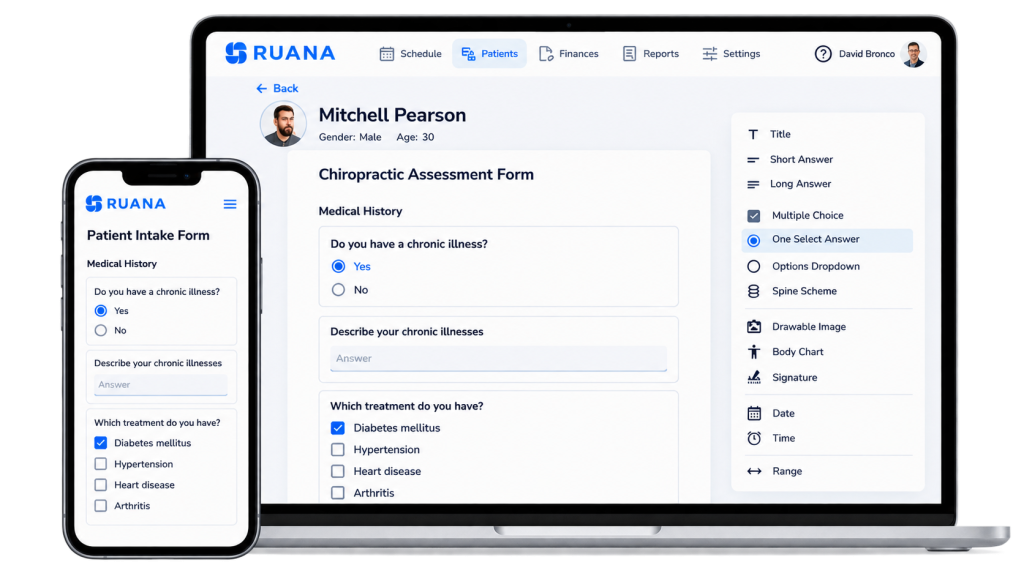
Digital intake forms allow patients to complete their paperwork before arriving at the clinic. This allows your team to review submitted information in advance and identify anything that needs clarification. It can also make the first appointment feel less rushed. Consider a new patient booked for 9:00 AM. In a paper-based workflow, the patient might arrive at 8:50 AM, receive several forms, and still be completing them when the appointment is scheduled to begin.
With a digital workflow, much of that information can already be available in the patient’s record. Your receptionist can focus on welcoming the patient instead of distributing paperwork. Digital intake forms in Ruana help clinics collect patient information before appointments and keep submitted forms connected to patient records.
Practical tip: Review your intake questionnaire every few months. Remove unnecessary questions and make sure each section has a clear clinical or administrative purpose.
4. Make SOAP Notes Part of the Appointment Workflow
Clinical documentation is one of the most important responsibilities in chiropractic practice. It is also one of the easiest tasks to postpone during a busy day.
When appointments run back to back, a chiropractor may decide to finish one note later, then another, and another. By the end of the afternoon, several patient visits still need to be documented. The longer documentation is delayed, the harder it may become to recall visit-specific details accurately.
Accurate documentation is particularly important for chiropractors treating Medicare patients in the United States. The Centers for Medicare & Medicaid Services (CMS) requires records that support the medical necessity of covered chiropractic services. For follow-up visits, documentation should include relevant changes in the patient’s condition, examination findings, and an evaluation of treatment effectiveness. Review the officialCMS chiropractic documentation requirementsfor more details.
Use a Consistent Documentation Structure
SOAP notes organize clinical documentation into four sections:
Subjective: The patient’s reported symptoms, concerns, and progress.
Objective: Examination findings and other relevant observations.
Assessment: The practitioner’s clinical interpretation.
Plan: Treatment provided, recommendations, and follow-up planning.
Using a consistent structure helps chiropractors know where information belongs and reduces the temptation to rewrite similar explanations from scratch.
Where practical, aim to complete routine documentation shortly after the appointment. Structured charting tools and reusable elements can make this easier, as long as every note still reflects what actually happened during that patient’s visit.
For example, a follow-up patient may have unchanged symptoms but a different response to treatment. The clinical note should capture that difference rather than simply duplicate the previous visit.
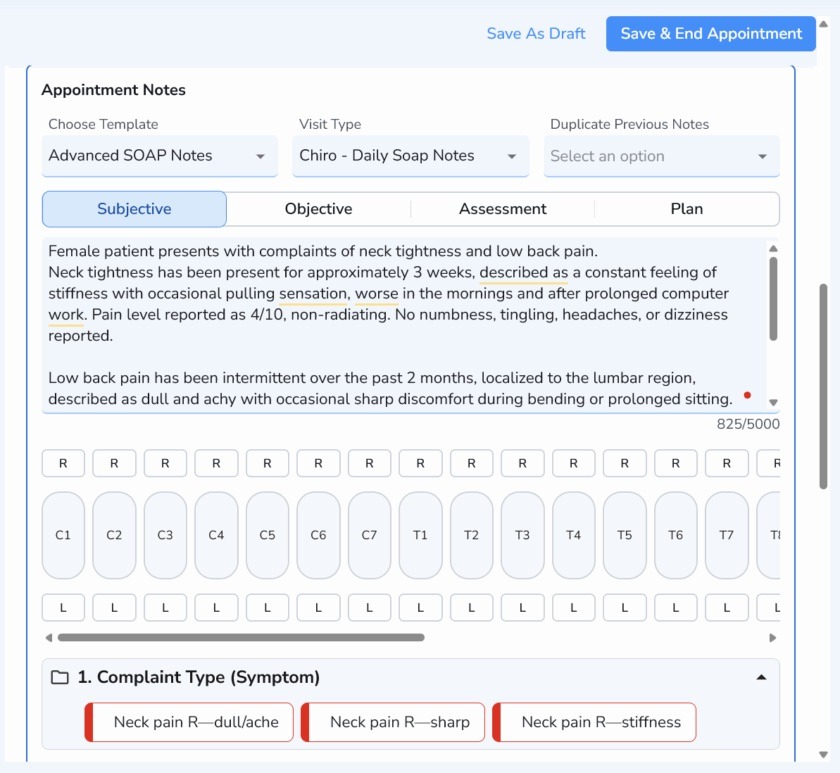
Ruana’s SOAP notes software keeps clinical documentation connected to patient records, appointment history, and intake information. The objective is to make accurate documentation easier, not to replace clinical judgment.
5. Reduce Front Desk Work at Checkout
Checkout is another place where small delays can accumulate. After an appointment, a receptionist may need to confirm the service, calculate the amount due, record a payment, provide documentation, and arrange the patient’s next visit. When scheduling, charting, and billing take place in separate systems, the team may need to retrieve or enter the same information repeatedly.
Keep Visit Information Connected
A more efficient checkout process begins with making the necessary appointment and patient information easy to access. Connecting checkout with appointment information can help reduce administrative work at the front desk. Staff should be able to identify the appointment, confirm the service provided, complete the required billing steps, and move on to the next patient without searching through unrelated screens.
For example, imagine three patients finishing their appointments within ten minutes. If each checkout requires several manual lookups, reception quickly becomes congested. If the relevant appointment information is already organized, the team can work through those visits more smoothly. This is particularly important in multi-practitioner chiropractic clinics, where several providers may be finishing appointments at similar times.
The exact billing process will depend on your country, payment model, and any applicable insurance requirements. The underlying principle remains the same: avoid entering the same information twice whenever possible.
6. Automate Routine Appointment Communication
How much time does your practice spend reminding patients about upcoming appointments? Phone calls, manual text messages, and individual confirmation emails may seem manageable when the schedule is light. As the number of appointments grows, however, these tasks can become repetitive.
Automated confirmations and reminders help communicate essential appointment details without requiring your receptionist to contact every patient individually. Patients receive timely information, and your team has more time for conversations that need a human response.
Ruana supports automated email confirmations and appointment reminders, with SMS reminders available as an optional add-on. Automation will not prevent every missed appointment, but it can make your reminder process more consistent.
Keep Messages Simple
An appointment reminder usually needs only the essential details: the appointment date, time, location, and any relevant instructions. Avoid overwhelming patients with unnecessary information. Also, make sure your team knows which situations still require personal contact, such as appointment changes that need confirmation or patients who have specific accessibility needs.
7. Give Your Team a Clear Daily Workflow
Even well-designed software cannot solve an unclear office process. When nobody knows who is responsible for a task, work can be delayed, repeated, or forgotten. This is particularly common in clinics where chiropractors, assistants, and reception staff share administrative responsibilities. A simple daily workflow helps everyone understand what happens next.
Example: A Chiropractic Patient’s Visit
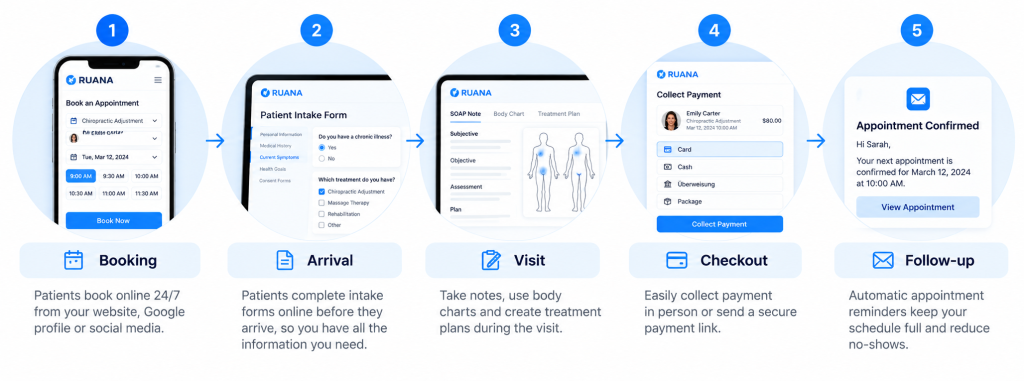
Before the appointment: the patient books an available time, receives the required information, and completes any necessary intake forms.
At arrival: reception confirms the patient’s arrival and checks whether any administrative details are missing.
During the visit: the chiropractor reviews the relevant record, provides care, and documents the visit according to clinical requirements.
At checkout: the team completes billing, provides any required payment documents, and arranges follow-up care where appropriate.
After the appointment: records are finalized, and any necessary follow-up communication is handled.
Each step should have a clear owner. In a solo practice, the chiropractor may perform nearly all of these tasks. In a larger clinic, the work may be divided between several team members. Either way, a consistent process helps reduce uncertainty.
A Simple Exercise: Calculate Your Practice’s Administrative Workload
You don’t need complicated software to estimate how much time your practice spends on repetitive administration. Start with a typical working day. Let’s imagine a chiropractic clinic sees 30 patient appointments. If unnecessary administrative steps add just three extra minutes per appointment, that’s: 30 appointments × 3 minutes = 90 minutes per day. Over four working days, that represents six hours of potentially avoidable administrative effort. This is an illustrative calculation, not a measured industry average or a promise of time savings. Your actual results will depend on how your clinic operates.
The exercise is useful because it makes small inefficiencies visible. Instead of asking, “How can we make our practice more efficient?” you can ask a more useful question: “Which repeated task could we simplify by two or three minutes?” That gives your team a realistic starting point.
How to Reduce Administrative Work: Where to Start
Not every task should be automated. Some conversations are important to patient care, and some documentation requires careful professional attention. The most useful approach is to separate repetitive administrative steps from work that genuinely needs individual judgment. Start by asking:
Does this task happen several times every day?
Are we entering information that already exists elsewhere?
Does the task interrupt patient care or slow down reception?
Could a standardized process make the result more consistent?
Would changing the process preserve accuracy, privacy, and patient experience?
If the answer is yes to several of these questions, the task is probably worth reviewing. For many chiropractic practices, scheduling, intake, clinical documentation, appointment reminders, and checkout are sensible places to begin.
How Practice Management Software Can Help
A disconnected collection of tools can create as much work as it removes. Your team might use one platform for appointments, another for patient forms, a separate documentation system, and an additional tool for payments. Each system may work well individually. The problem appears when information must move between them. Practice management software can help by bringing related tasks into one workflow.
Ruana is designed for chiropractors and other health and wellness practitioners who want to manage scheduling, digital intake forms, SOAP notes, patient records, reminders, and billing from one place. Rather than changing the way chiropractors provide care, the aim is to make the administrative work surrounding that care easier to manage. Of course, software is only one part of the solution. Clear responsibilities, accurate records, and consistent daily routines are just as important.
Final Thoughts
Reducing administrative work in a chiropractic practice doesn’t require a complete operational overhaul. Start with the tasks that interrupt your day most often. Look for duplicated information, delayed documentation, unnecessary scheduling calls, and extra checkout steps. Then improve one part of the workflow at a time.
A clearer calendar, completed intake forms before appointments, structured SOAP notes, and a more organized checkout process can all help your team spend less time managing routine tasks. Most importantly, make sure the changes work for the people using them every day.
About the Authors
★★★★★4.9 · 329 Reviews
Rouzbeh NoroozyChiropractor & Co-Founder · Palmer West · UC Berkeley · 14 Years of ExperienceRouzbeh Noroozy is a chiropractor with 14 years of clinical experience and co-founder of Ruana practice management software. He completed his undergraduate studies at the University of California, Berkeley and graduated from the renowned Palmer College of Chiropractic West in California. As a practicing clinician and clinic owner, he understands firsthand the administrative challenges practices face — and which digital tools genuinely help streamline day-to-day operations.
Anastasiia NoroozyMedical Graduate & Co-Founder · 8 Years of ExperienceAnastasiia Noroozy is a medical graduate and co-founder of Ruana with 8 years of experience working directly with patients at the clinic in Cologne. She manages the day-to-day flow of the practice and knows every patient-facing process from the inside out — from intake and scheduling to follow-up care. Her hands-on clinical and operational experience directly shapes how Ruana is built to work in the real world.
Our team will review your inquiry and get back to you as soon as possible.
Privacy Settings
To provide the best experiences, we use technologies like cookies to store and/or access device information. Consenting to these technologies will allow us to process data such as browsing behavior or unique IDs on this site. Not consenting or withdrawing consent, may adversely affect certain features and functions.
Functional
Always active
The technical storage or access is strictly necessary for the legitimate purpose of enabling the use of a specific service explicitly requested by the subscriber or user, or for the sole purpose of carrying out the transmission of a communication over an electronic communications network.
Preferences
The technical storage or access is necessary for the legitimate purpose of storing preferences that are not requested by the subscriber or user.
Analytics
The technical storage or access that is used exclusively for statistical purposes.The technical storage or access that is used exclusively for anonymous statistical purposes. Without a subpoena, voluntary compliance on the part of your Internet Service Provider, or additional records from a third party, information stored or retrieved for this purpose alone cannot usually be used to identify you.
Marketing
The technical storage or access is required to create user profiles to send advertising, or to track the user on a website or across several websites for similar marketing purposes.
To provide the best experience for our practitioners, we use cookies to personalize content, analyze our traffic, and support our marketing efforts. By clicking 'Accept', you consent to our use of these technologies. You can manage your preferences at any time.
Functional
Always active
The technical storage or access is strictly necessary for the legitimate purpose of enabling the use of a specific service explicitly requested by the subscriber or user, or for the sole purpose of carrying out the transmission of a communication over an electronic communications network.
Preferences
The technical storage or access is necessary for the legitimate purpose of storing preferences that are not requested by the subscriber or user.
Analytics
The technical storage or access that is used exclusively for statistical purposes.The technical storage or access that is used exclusively for anonymous statistical purposes. Without a subpoena, voluntary compliance on the part of your Internet Service Provider, or additional records from a third party, information stored or retrieved for this purpose alone cannot usually be used to identify you.
Marketing
The technical storage or access is required to create user profiles to send advertising, or to track the user on a website or across several websites for similar marketing purposes.